
MyWeiss Portal
MyWeiss is the customer portal which empowers your team with instant access to equipment data, service cases, maintenance information, and documentation – audit relevant documentation is accessible anytime and anywhere. No more scattered files or Excel-based service documentation.
What's inside
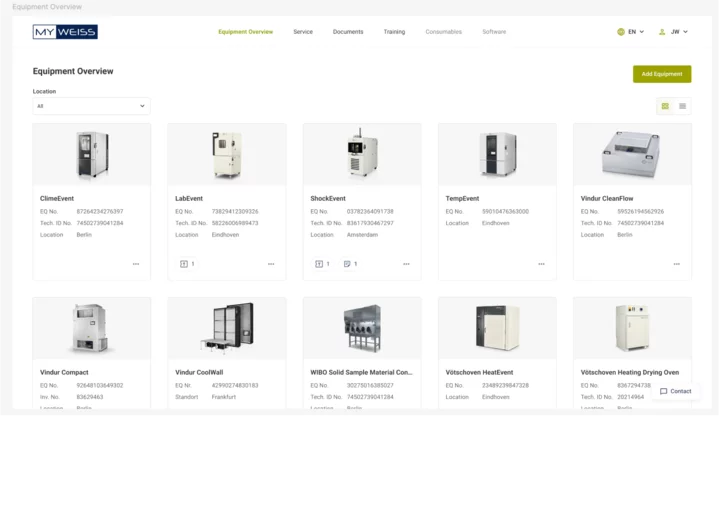
Asset Management
All your assets in view — structured with individual names, equipment numbers, and locations. Smart filters help you quickly identify equipment status and upcoming service needs.
Access service orders and notes directly, reduce manual searching, and maintain full transparency across your entire equipment landscape.
FAQs
How do I register for the MyWeiss Portal?
Please complete the registration form on this page with the required information. After submission, we will prepare your portal access within approximately 6 weeks. Once everything is set up, you will receive an invitation email with instructions for final registration.
Do I need to provide serial numbers or device numbers to get access?
No. Based on your company and location, the relevant devices/chambers and their serial numbers will automatically be assigned to your portal access.
I haven’t received my invitation email within the specified timeframe – what should I do?
First, check your spam or junk folder. If the email is not there, please contact our support team at [email protected] to confirm your email address and request the invitation again.
Can I also set up access for my colleagues?
Yes. You can request additional access for your colleagues by contacting our support team or asking them to complete the registration form on this page.
How can I view only the devices/chambers relevant to my lab or hall? Can I customize the portal view?
Currently, filtering by location or customizing the portal view is limited. Access to devices/chambers is automatically assigned. You can use the available filters and search functions to quickly find your equipment. We are working on solutions to improve filtering and enable personalized views in the future.
Where can I find specific device information and service documents?
After logging in, go to the “Equipment Overview” section. There, you can select a chamber or system from the overview or use the corresponding menu options to view detailed data, documents, and the service history of your equipment. Alternatively, you can use the “Documents” or “Service” menus for a quick overview.
How can I update data in the portal (e.g., chamber address, remove outdated chambers, add missing chambers)?
These updates can be made using the relevant functions in the portal. Please note that these functions are only available to certain user roles.
Can I add chambers or systems from other manufacturers (not Weiss Technik)?
Yes. You can use the “Add Equipment” function in the portal. This feature requires special permissions that are not available to all users.
Is the portal available internationally?
Currently, the MyWeiss Portal is only available in Germany and for devices/chambers located in Germany.
When will the portal be available in other countries?
We are actively working to expand international availability. You can register now, and we will contact you as soon as the portal becomes available in your region.
I have ideas or suggestions to improve the portal. How can I share them?
We welcome your feedback! Please send your ideas to [email protected]. Not all suggestions can be implemented, but each one will be reviewed and considered for future developments.
I have changed my email domain – how do I update my access?
Please contact our support team at [email protected] to update your email address and ensure uninterrupted access.
Why can’t I see certain devices/chambers, data, or documents?
This may be due to synchronization delays or permission settings. If the issue persists, please contact our support team so we can resolve it.
The portal is slow or experiencing performance issues. What should I do
Please report the issue to our support team at [email protected] so we can assist you.
Register today for MyWeiss Portal.
Full access is currently available for customers in Germany. Customers from other regions are welcome to register and will be notified as soon as MyWeiss becomes available in their country.